
 PROMOTIONS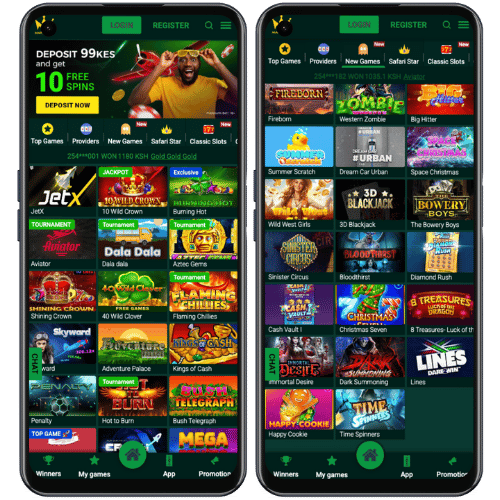
Marakumi app download for Android in Kenya
The Marakumi Casino app gives Android players a direct route to the casino lobby from a phone home screen. It is built for the same games and account features found on the desktop site: open slots, jump into Aviator or another crash game, check a promotion and visit the cashier without moving between separate services. The layout is compact enough for a small screen while keeping the major categories visible.
For Kenyan players, the useful part of mobile access is how naturally it fits into an everyday routine. You can sign in with your Marakumi account, use KES in the cashier and choose M-Pesa or bank transfer when you want to add funds. The app is designed for current Android devices as well as many older phones, so the game lobby remains easy to browse without a large display.
What you can do in the Marakumi mobile app
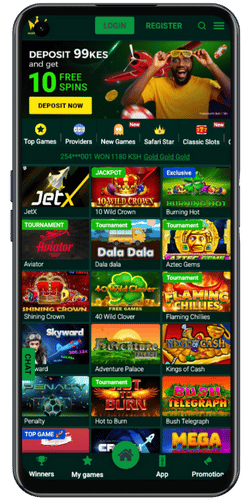
The app follows the familiar Marakumi casino structure. The main lobby groups games by category, making it simple to switch from classic reels and video slots to live tables, virtual sports or fast multiplier games. Aviator and JetX sit alongside slot titles, while the promotion area brings together free spins, tournament cards, daily rewards and current prize events.
Your account area stays connected to the same login used on the website. That means a player can open a game in the app, check the transaction area, return to a promotion or continue in the mobile browser without creating another profile. The interface also gives a quick route to customer support and the game search, which is handy when you already know the title you want to open.
How to install the Marakumi APK
Installing the Marakumi app takes only a few steps. Start on an Android phone, open the Marakumi mobile site and find the Android download button. The download creates an APK file; once it has finished, open the file from the browser notification or your downloads folder and follow the on-screen installation steps. The app then appears in the phone menu like any other Android app.
- Open the Marakumi mobile site from an Android browser.
- Choose the Android download button and save the APK file.
- Open the completed download and install the app on the phone.
- Launch Marakumi, sign in and open the casino lobby.
- Choose slots, Aviator, crash games or a promotion from the main screen.
Once the application is installed, the Marakumi icon gives you a fast way back to the lobby. You can use the same account details as the website, so there is no separate registration flow for mobile play. The categories, promotions and payment routes remain connected to the same KES balance.
Marakumi app system requirements
The Marakumi Android APK is listed for Android 10.0 and later. The stated file size is 42.3 MB, with at least 1 GB of RAM and a 1.4 GHz processor recommended for smooth access. Most current Android phones meet these requirements, and the application is designed to work with common screen sizes.

Updating the Marakumi app
When a new version is available, the app sends a notification with the update option. Select the notification, download the latest version and complete the installation to continue using the new build. Keeping the app current gives you the newest lobby layout, game cards and mobile features in the same familiar place.
Marakumi mobile site and iPhone access
The Marakumi Casino app is made for Android. If you use an iPhone, open Marakumi in Safari or another mobile browser instead. The mobile website gives access to the casino lobby, account area, payment screen, Aviator, crash games, slots and promotions without an APK download. You can also add a browser shortcut to the home screen for faster return access.
The Android app and mobile site share the main casino experience. The app is useful when you want a dedicated icon and phone notifications, while the browser is the quickest option when you do not want to install a file. Whichever route you choose, the games, account login and cashier are all available from the same Marakumi profile.
| Mobile option | Best for | What you get |
|---|---|---|
| Android app | Home-screen access | Dedicated Marakumi icon, casino lobby and notifications |
| Mobile browser | No installation | Slots, Aviator, payments and promotions through the website |
| Home-screen shortcut | Quick browser return | Fast access to the mobile version from the phone menu |
Games, promotions and payments on mobile
The Marakumi app gives you the same variety found in the casino lobby. Classic and video slots sit beside jackpot games, live dealer tables, virtual sports and number games. The faster categories include Aviator, JetX and other crash titles, while the bonus area lists free spins, daily rewards, Lucky Wheel and tournament events. You can open the Marakumi promotions guide or the Crash Games page when you want a closer look at those sections.
M-Pesa is the main mobile-money route for Kenyan players using Marakumi. Airtel Money and bank transfer are also available in the cashier. Open the payment section, choose the option you prefer and continue to the game lobby after the transaction. The payment guide explains the listed limits and processing times for each method.
Open Marakumi on your phone
Choose the Android app or mobile web, then open the games you want from one casino lobby.
DOWNLOAD APPMarakumi app FAQ
Where can I download the Marakumi APK?
Open Marakumi on an Android phone and choose the Android download button on the mobile site. After the APK downloads, open the file and follow the installation steps.
Can I use Marakumi without installing an app?
Yes. The Marakumi mobile website works in a phone browser and includes the game lobby, promotions, cashier and account area without an APK installation.
Does the Marakumi app work on iPhone?
The listed Marakumi app is for Android. iPhone users can open the mobile website in Safari or another browser and add a shortcut to the home screen.
What games are available in the Marakumi app?
The mobile lobby includes slots, crash games, Aviator, live tables, virtual sports, promotions and other Marakumi casino categories.